Business Tools
Pocket Invoice: A Free Invoice Maker for Web, iOS and Android With an MCP Server for AI Assistants
Pocket Invoice is a free invoice and estimate maker for Web, iOS and Android, with a hosted MCP server that lets Claude, ChatGPT and Cursor draft invoices.
CodeHype8 min read
For freelancers and small service businesses, invoicing is necessary but rarely enjoyable. Spreadsheet templates break, client details get retyped for every job, and many invoicing apps charge a monthly fee for what is often a simple task.
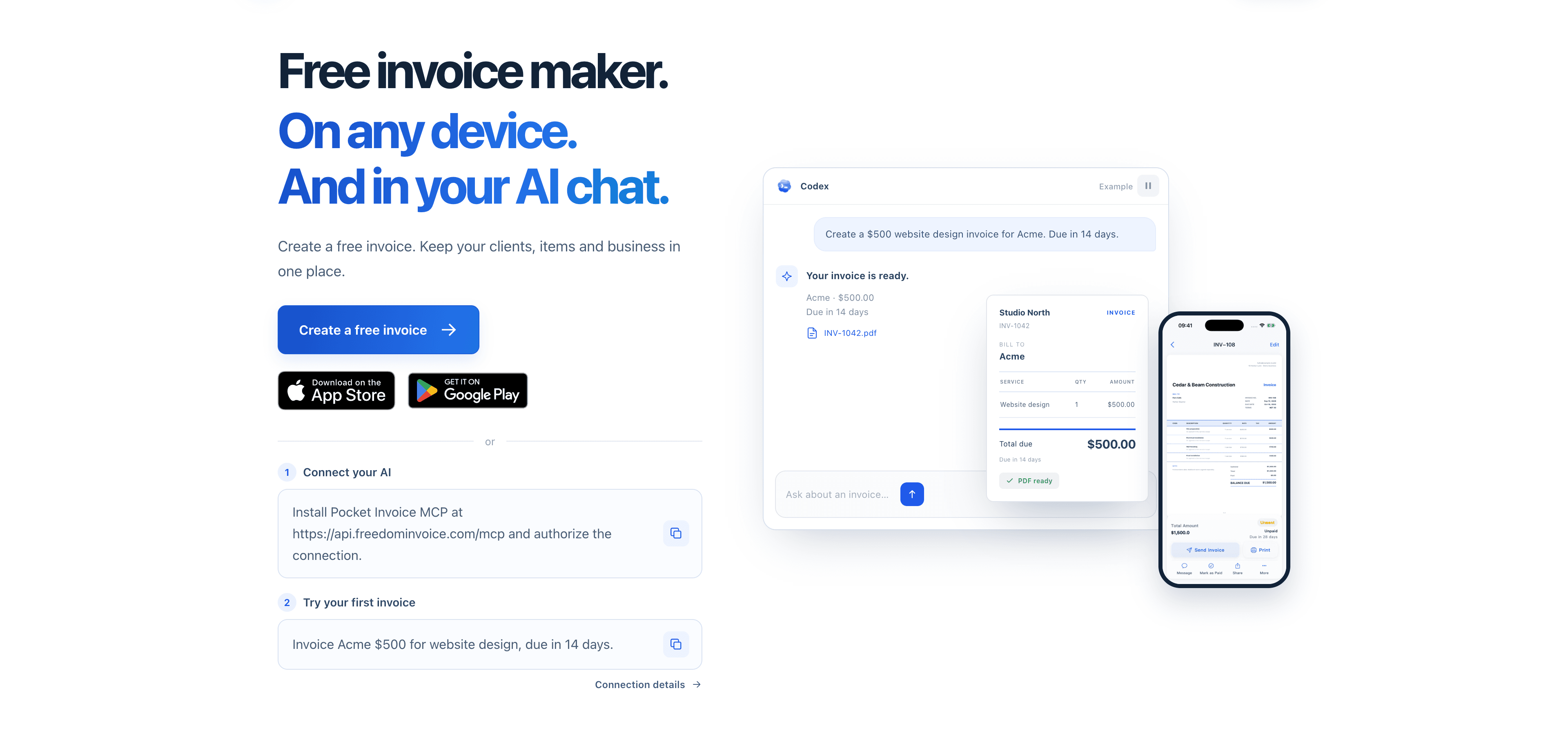
Pocket Invoice is a free invoice maker for the web, iOS and Android. It lets you create invoices and estimates, reuse client and item details, and export branded PDFs. It also provides a hosted MCP server, so AI assistants like Claude, ChatGPT and Cursor can prepare invoices from a plain-language description. You can find downloads and setup guides on Pocket Invoice's official website.
In this article, we'll look at Pocket Invoice's features, how the AI assistant connection works, what "free" covers, and who the app is best suited for.
What Is Pocket Invoice?
Pocket Invoice is an invoicing and estimating app for independent professionals and small businesses, including freelancers, consultants, designers, developers, agencies, contractors and trades. It is available as a browser app and as mobile apps for iOS and Android, with your data shared across all three.
You may notice that the website and app run on freedominvoice.com domains, and the Android app also uses the Freedom Invoice name in places. Throughout the website itself, the product is called Pocket Invoice.
Beyond the app, the website offers free invoice templates, business calculators and guides. Pocket Invoice is listed in the Finance category on CodeHype, and you can see more screenshots on its CodeHype listing.
Key Features of Pocket Invoice
Invoices and Estimates
You can create unlimited invoices as well as estimates. Estimates help you agree on scope and price before work starts, and the Android listing mentions converting an estimate into an invoice once the job is confirmed.
Reusable Client and Item Records
Client details and products or services are saved, so you can add them to a new document in a few taps instead of retyping them. The app also keeps inventory or item records for businesses that sell products.
Taxes, Discounts and Payment Terms
According to the app store listings, taxes can be applied per item or to the total, as inclusive or exclusive, and discounts can be applied per item or per invoice. You can also add shipping and payment terms.
Branded PDF Export
Add your business details and logo, choose from around 20 invoice styles, and export a professional PDF to send to your client.
Multiple Companies, Dashboard and Expenses
One account can manage multiple companies, which helps if you run more than one business. A dashboard shows revenue and outstanding balances, and the app includes expense tracking, client statements and reports.
Free Hosted MCP Server for AI Assistants
Pocket Invoice's most distinctive feature is its hosted Model Context Protocol (MCP) server. Once connected and authorized, a compatible AI assistant can:
- Create, edit, copy or convert invoices, estimates and purchase orders
- Generate PDFs using your saved logo and design
- Find or update clients, products and stock
- Report business figures, such as sales, outstanding balances and expenses for a date range
- Record payments or deposits against invoices
- Prepare documents for sending by email, with recipient review and confirmation
The server uses Streamable HTTP at api.freedominvoice.com/mcp and requires OAuth authorization.
How Pocket Invoice Works
Creating an Invoice in the App
- Sign up on the web, iOS or Android app.
- Add your business details and logo.
- Add a client and the line items for the work or products supplied.
- Set taxes, discounts and payment terms.
- Review the invoice and download or share the PDF.
Since data is shared across platforms, you can start an invoice on your phone and finish it on your laptop.
Connecting an AI Assistant via MCP
Pocket Invoice provides setup instructions for Claude, ChatGPT (in Developer mode), Cursor, Windsurf and Codex. The general process is:
- Sign in to or create a Pocket Invoice account.
- In your AI assistant, add a custom connector or MCP server named Pocket Invoice, using the Streamable HTTP server address.
- Authorize the connection through OAuth, choose one company, and approve the permissions.
- Describe the customer, items and prices in a chat, then review what the assistant prepares.
For example, you might ask your assistant to "create an invoice for Acme for 10 hours of design work at $80 an hour, due in 14 days" and then check the generated PDF before sending it.
Built-in Safeguards
The MCP connection includes some sensible limits:
- Sending by email starts disabled, and every send requires confirmation.
- The assistant cannot take card payments, transfer money or issue refunds. Recording a payment only updates your records.
- The assistant can't go beyond your account or team permissions.
- You can revoke an assistant's access from the AI connections page.
Use Cases
Freelancers Billing Projects
A freelance designer can send an estimate for a branding project, then invoice each milestone using saved client details.
Contractors Itemizing Labor and Materials
A contractor can list labor and materials as separate line items, apply tax and send a PDF from their phone after finishing a job.
Consultants Who Live in AI Chat
A consultant who already works in Claude or ChatGPT can describe billable work in a sentence and let the assistant draft the invoice, then review it before it goes out.
Checking Outstanding Balances
Through the dashboard, or by asking a connected AI assistant, a small business owner can quickly see which invoices are still unpaid.
Pocket Invoice Pricing
Pocket Invoice's website describes the app as completely free, with no credit card required, and its refund page states that all features are free on the web, iOS and Android. The App Store lists the app as free with no in-app purchases.
Two details are worth checking for yourself, though:
- The Google Play listing currently shows in-app purchases.
- The MCP page notes that account, document, storage and membership limits still apply, without describing those limits.
In short, the core invoicing features and the MCP server are presented as free, but it's worth confirming any limits that apply to your account.
Who Should Use Pocket Invoice?
Pocket Invoice is a good fit for:
- Freelancers and consultants who need clean invoices and estimates without paying for software
- Contractors and trades who want to invoice from a phone
- Small businesses running more than one company under a single account
- People already using AI assistants who want to create invoices through a chat
If you need online card payments built into invoices, payroll or full accounting, you'll likely need a dedicated accounting or payments tool alongside it. For another option aimed at small businesses, see our Incusia invoicing software review.
Advantages and Limitations
Advantages
- Free core features across web, iOS and Android
- Reusable clients and items that save time on repeat billing
- Flexible tax and discount options, plus estimates and statements
- Multiple companies under one account
- A hosted MCP server with documented setup for major AI assistants
- Careful AI safeguards, with confirmation for sending and no access to money movement
Limitations
- No built-in payment collection through the assistant. The MCP server cannot take card payments or move money.
- Unclear account limits. The MCP page mentions limits that aren't described elsewhere.
- Mixed signals on pricing. The website says everything is free, but the Google Play listing shows in-app purchases.
- Limited company information. The website doesn't name the legal entity behind the product.
Final Verdict: Is Pocket Invoice Worth Using?
Pocket Invoice covers the everyday invoicing needs of freelancers and small businesses, including invoices, estimates, reusable records, tax and discount options and branded PDFs, on the web and on both major mobile platforms, at no cost. Its hosted MCP server is what makes it stand out, letting you create invoices through an AI assistant with sensible safeguards in place.
If you want simple, free invoicing and you're curious about letting an AI assistant handle the paperwork, it's an easy tool to try. Visit the official Pocket Invoice website to get the apps or follow the MCP setup guide.
Frequently Asked Questions
Is Pocket Invoice really free?
According to its website, all Pocket Invoice features are free on the web, iOS and Android, and no credit card is required. The Google Play listing does show in-app purchases, so check the current details in the app.
What is the Pocket Invoice MCP server?
It is a hosted Model Context Protocol server that lets authorized AI assistants create and edit invoices, estimates and purchase orders, generate PDFs, manage clients and products, and report business figures in your Pocket Invoice account.
Which AI assistants work with Pocket Invoice?
Pocket Invoice documents setup for Claude, ChatGPT in Developer mode, Cursor, Windsurf and Codex.
Can the AI assistant send invoices or take payments?
It can prepare documents for email, but sending starts disabled and every send requires your confirmation. It cannot take card payments, transfer funds or issue refunds.
Can I use Pocket Invoice on my phone?
Yes. Pocket Invoice has iOS and Android apps as well as a web app, and your data is shared across all of them.
Why does the website use the freedominvoice.com domain?
The Pocket Invoice website, web app and MCP server all run on freedominvoice.com domains, and the Android app also uses the Freedom Invoice name. The product itself is presented as Pocket Invoice.